Curve Track — manual
A shape-per-step CV/gate sequencer. Each step is one of 25 curve shapes scaled between Min and Max, with gates derived live from the curve and a per-pattern Chaos / Wavefolder / Filter chain.
2. The Curve Shapes
3. The Signal Chain
4. Gate Generation
5. The Step Edit Page
6. Playback & Timing
7. Track Setup
8. Setup & Routing
Introduction
The Curve track is a shape-per-step CV/gate sequencer. Each step is not a note but a curve segment — one of 25 built-in shapes (ramp, exp, log, smooth, bell, triangle, step, multi-ramp …) scaled between a per-step Min and Max voltage. As the playhead sweeps a step it reads the shape continuously and emits CV; gates are derived from what the curve does (its peaks, troughs, zero crossings, slope, level) rather than from a stored on/off pattern. On top of the raw shape sits a per-pattern signal chain — Chaos, Wavefolder, DJ Filter, Crossfade — and a set of generative Curve Studio tools that draw, transform, and gate-stamp whole ranges of steps at once.
Everything here is grounded in the firmware as built — defaults, ranges, enum members, key bindings, and step-grid maps come from the model, engine, and UI code.
Prerequisites
- Familiarity with the xformer track/sequence/edit page model (Page+S2 / Page+S1 / Page+S0).
- Understanding of CV/gate concepts in modular synthesis, and 1V/oct vs. modulation-CV ranges.
- A free CV output to patch the track to (filter cutoff, VCA, pitch — anything CV-controlled).
Part 1 · Overview
A Curve track plays a sequence of steps, but each step holds a shape, not a note:
- Each step stores a curve Shape (one of 25), a Min and Max level (8-bit, 0..255), a Gate event mask, and a Gate Parameter (trigger length or advanced-gate mode).
- The playhead advances step to step (grid-locked or free-running) and, within each step, sweeps a continuous fraction 0→1 through that step's shape.
- CV output is the shape value scaled into Min..Max, pushed through the per-pattern signal chain and limited to ±5V.
- Gate output is generated live from the curve: zero crossings, peaks, troughs, slope, or level comparators.
There is no separate "note" — the curve is the data. A step playing RampUp from Min=0 to Max=255 is a rising ramp across that step; a Bell shape is a single smooth hump.
The two playback modes
| Mode | Advance | Speed control |
|---|---|---|
| Aligned | grid-locked: a step lasts exactly divisor ticks | divisor + clock mult only |
| Free | phase-accumulator: step advances when an internal phase crosses 1.0 | Curve Rate (0–4×) modulates speed for audio-rate FM |
Aligned is quantized and rhythmic. Free is continuous and FM-capable; Curve Rate has no effect in Aligned mode. Both feed the same signal chain and 1kHz output interpolation. Play Mode is a track param (Part 7).
Part 2 · The Curve Shapes
A step's Shape selects one of 25 functions, evaluated over a fraction x (0→1) that runs across the step. The result (0→1) is then scaled into the step's Min..Max.
| # | Name | Curve over the step |
|---|---|---|
| 0 | Low | flat at 0 (bottom) |
| 1 | High | flat at 1 (top) |
| 2 | RampUp | linear rise 0→1 |
| 3 | RampDown | linear fall 1→0 |
| 4 | ExpUp | exponential rise (x²) |
| 5 | ExpDown | exponential fall ((1−x)²) |
| 6 | LogUp | logarithmic rise (√x) |
| 7 | LogDown | logarithmic fall (√(1−x)) |
| 8 | SmoothUp | S-curve rise (smoothstep) |
| 9 | SmoothDown | S-curve fall |
| 10 | RampUpHalf | ramp up in first half, flat 0 in second |
| 11 | RampDownHalf | ramp down in first half, flat 0 in second |
| 12 | ExpUpHalf | exp up in first half, then flat 0 |
| 13 | ExpDownHalf | exp down in first half, then flat 0 |
| 14 | LogUpHalf | log up in first half, then flat 0 |
| 15 | LogDownHalf | log down in first half, then flat 0 |
| 16 | SmoothUpHalf | smooth up in first half, then flat 0 |
| 17 | SmoothDownHalf | smooth down in first half, then flat 0 |
| 18 | Triangle | up then down, single peak at centre |
| 19 | Bell | raised-cosine hump (½−½·cos) |
| 20 | StepUp | 0 for first half, jumps to 1 |
| 21 | StepDown | 1 for first half, drops to 0 |
| 22 | ExpDown2x | two exp-down lobes across the step |
| 23 | ExpDown3x | three exp-down lobes |
| 24 | ExpDown4x | four exp-down lobes |
The shape index range is 0..Curve::Last-1 (24); the editor clamps to it. The …Half shapes fire in the first half of the step and rest at 0 for the second — one-shot envelopes per step. ExpDown2x/3x/4x pack 2/3/4 decay lobes into a single step.
Min / Max and inversion
- Min and Max are 8-bit (0..255), normalized to 0..1, then denormalized into the sequence's voltage Range.
- The shape scales as
min + value × (max − min). With Min < Max the step rises into its shape; with Min > Max the shape is inverted (the segment runs downward). Min=0, Max=255 is the default full-range step.
Shape Variation
Each step also stores a Shape Variation (a second shape index) and a Variation Probability (0..8). On each trigger the engine rolls: with probability variationProbability/8 (plus the track's Shape P. Bias) the step plays its variation shape instead of its main shape — per-step shape randomness without changing the stored main shape.
Part 3 · The Signal Chain
After the raw shape is evaluated and scaled, every Curve step's value flows through a fixed per-sequence chain before it reaches the CV output:
Step Shape → Chaos mix → Wavefolder → DJ Filter → Crossfade → Limiter (±5V) → 1kHz interp → Slide → CV outChaos
A generative source mixed in before the wavefolder. It crossfades between the clean shape and a chaotic signal, so at 100% Amount you hear pure chaos and the output always stays in range.
| Param | Range | Default | Role |
|---|---|---|---|
| Amount (AMT) | 0–100% | 0 | dry/chaos crossfade depth |
| Rate (HZ) | 0–127 → ~0.01–50 Hz | 65 | evolution speed (3-band curve) |
| Param 1 (HEAT) | 0–100 | 45 | algorithm parameter A |
| Param 2 (DAMP) | 0–100 | 62 | algorithm parameter B |
| Algorithm | Latoocarfian / Lorenz | Latoocarfian | stepped jumps vs. smooth attractor |
| Range | Mid / Below / Above | Mid | centre of the wiggle (mid / bottom-quarter / top-quarter) |
Latoocarfian has a stepped sample-and-hold character; Lorenz flows smoothly. The Range offset shifts the chaos centre into the bottom or top quarter of the voltage range.
Wavefolder
| Param | Range | Default | Role |
|---|---|---|---|
| Fold (FOLD) | 0.00–1.00 | 0.00 | folding amount (sine-based, exp-curved); 0 = bypass |
| Gain (GAIN) | 0.00–2.00 | 0.00 | input gain into the folder (mapped to internal 1×–5×) |
With Fold at 0 the folder is bypassed.
DJ Filter
FILTER, one knob, −1.00..+1.00, default 0:
- 0 (centre): dead zone, filter off.
- Negative: low-pass (more negative = lower cutoff).
- Positive: high-pass.
The filter state is always computed (so it tracks the signal), but only applied when the control leaves the dead zone.
Crossfade
XFADE, 0.00..1.00, default 1.00 (fully wet). It blends the original phased shape (dry, pre-Chaos/folder/filter) against the processed signal. At 0.00 you hear the clean shape; at 1.00 the full processed chain. XFADE is non-routable (UI-only).
Limiter, interpolation, slide
The processed voltage is hard-clamped to ±5V. The tick-rate sample is then linearly interpolated to ~1kHz to remove staircase artifacts, and finally passed through the track's Slide slew limiter (if Slide Time > 0) plus the track Offset.
Part 4 · Gate Generation
Curve tracks have no stored gate pattern. Gates are generated live from the curve each tick, driven by two per-step fields: the Gate event mask (4 bits) and the Gate parameter (0..7). The mask being zero or non-zero selects between two modes.
Event mode (mask ≠ 0)
When any event bit is set, the engine fires a trigger pulse when that curve event occurs. The pulse length comes from the gate parameter (exponential): 4 << param ticks, i.e. 4, 8, 16, 32, 64, 128, 256, 512 ticks.
| Bit | Constant | Event |
|---|---|---|
| 0 (1) | Peak | end of a rise (rising → flat/falling) |
| 1 (2) | Trough | end of a fall (falling → flat/rising) |
| 2 (4) | ZeroRise | upward zero crossing |
| 3 (8) | ZeroFall | downward zero crossing |
Advanced mode (mask = 0)
When the mask is zero, the gate parameter (0..7) selects a continuous gate mode that holds the gate high while a condition is true:
| Param | Mode | Gate high when |
|---|---|---|
| 0 | Off | never (no gate) |
| 1 | RisingSlope | curve is rising |
| 2 | FallingSlope | curve is falling |
| 3 | AnySlope | curve is moving (rising or falling) |
| 4 | Compare25 | level > 25% of range |
| 5 | Compare50 | level > 50% of range |
| 6 | Compare75 | level > 75% of range |
| 7 | Window | level between 25% and 75% |
Part 5 · The Step Edit Page
Page+S0 opens the Curve STEPS page. It is a single page with several edit modes cycled by F5; F1–F4 pick the active per-step layer, the step keypad selects steps, and the encoder edits the selected step(s) on the active layer.
The layers (F1–F4)
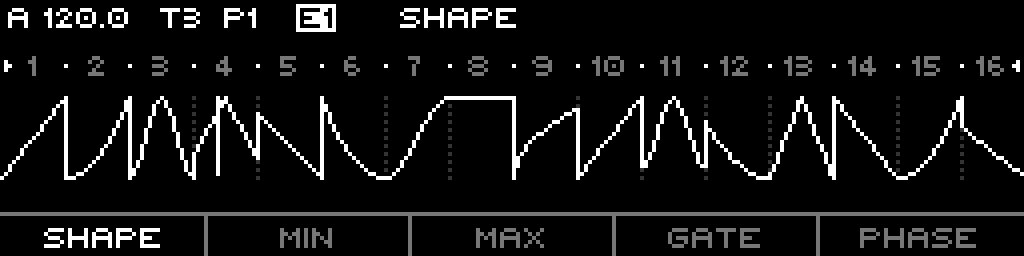
The footer shows SHAPE · MIN · MAX · GATE · PHASE. F1–F4 select layers; F5 cycles edit modes (Step → Phase → Wavefolder → Chaos → back).
- F1 SHAPE — cycles Shape → Shape Variation → Variation Probability on repeated presses (Shift+F1 jumps straight to Shape). In the variation layers the main shape is dimmed and the variation shape drawn bright.
- F2 MIN — edit each step's Min level. The Min line is drawn across the curve.
- F3 MAX — edit each step's Max level.
- F4 GATE — cycles Gate Mode (parameter) → Gate Events (mask). "GATE EVENTS" edits the Peak/Trough/Zero bit mask; "GATE MODE" edits the trigger length / advanced mode.
- F5 PHASE/NEXT — cycles the edit mode: Step → Global Phase → Wavefolder → Chaos → Step.
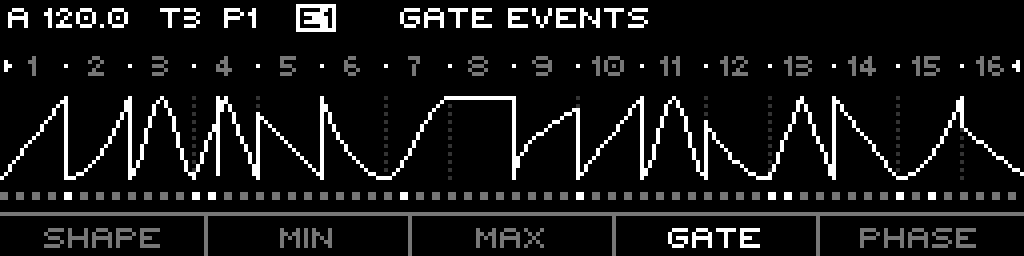
Holding the active function key while turning the encoder on MIN/MAX moves Min and Max together. On the Min/Max layers a single unpersisted selected step is monitored — its level is driven to the output so you can dial it by ear.
Editing steps
- Encoder on the selected step(s) edits the active layer. On Shape, no shift, ±1 shape index. On Min/Max, ±8 per detent (±1 with Shift or encoder-press for fine).
- Shift + encoder on Shape, multiple steps selected — builds a multi-step shape: the selection is rasterized into an ascending Min/Max staircase of the chosen shape.
- Shift + encoder on Min/Max, multiple steps selected — gradient edit: turning sets the last step's value and interpolates a linear ramp from the first selected step to it.
- Double-press a step (any layer, no shift) — toggles a Peak+Trough gate at 128-tick length (67% of beat), or clears it if already set.
Encoder edit-mode panels (F5)
Beyond Step, F5 reaches three full-width panels. In each, F1–F4 select a column; the encoder edits the focused column (press-turn to move the cursor).
- Global Phase Offsets the whole sequence read position 0–100% (canon / phase-shift). It is a track param.
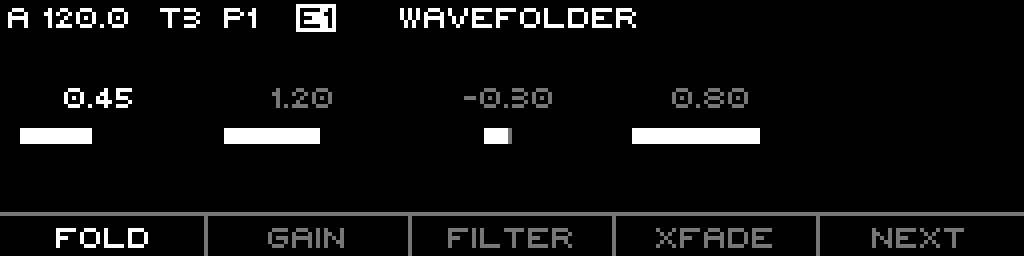
- Wavefolder columns FOLD · GAIN · FILTER · XFADE · NEXT — the four signal-chain params (Part 3).
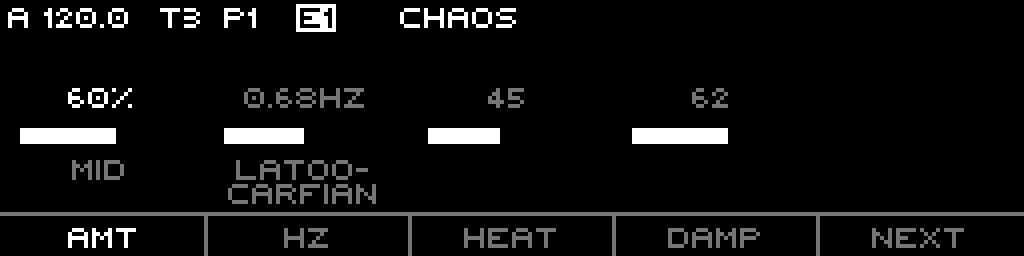
- Chaos columns AMT · HZ · HEAT · DAMP · NEXT. Shift+F1 cycles the Chaos Range (Mid/Below/Above); Shift+F2 cycles the Algorithm.
Step keypad and quick-edit
- S1–S16 select steps (the curve and detail readouts follow the selection).
- Left / Right move the visible section of 16 steps (the sequence holds up to 64). Shift + Left/Right shifts the selected steps' data.
- Page + S9–S16 open the quick-edit overlay for, in order: First Step, Last Step, Run Mode, Divisor, Reset Measure, Range (last two slots inert).
Curve Studio shortcuts (Page + step)
Four context menus stamp whole step ranges. With no selection they act on the loop range; with a single step selected they run from that step to the loop end; with multiple steps selected they act on the selection.
| Shortcut | Menu | Items |
|---|---|---|
| Page + S5 | LFO | TRI · SINE · SAW · SQUA · MM-RND (single-cycle waveforms; MM-RND randomizes Min/Max) |
| Page + S4 | Macro | MM-INIT · M-FM · M-DAMP · M-BOUNCE · M-RSTR (multi-step rasterized shapes) |
| Page + S6 | Transform | T-INV · T-REV · T-MIRR · T-ALGN · T-WALK (invert / reverse / mirror / align / smooth walk) |
| Page + S14 | Gate Presets | ZC+ · EOC/EOR · RISING · FALLING · >50% (stamp gate events/modes onto the range) |
(Step indices are 0-based key positions; on the panel these are buttons 5, 6, 7, 15.)
Context menu (long-press)
In Step / Global-Phase mode: INIT · COPY · PASTE · DUPL · GEN (init steps, copy/paste step selection, duplicate the loop, run the sequence generator). In Wavefolder / Chaos mode the menu becomes INIT · RAND · COPY · PASTE acting on that panel's params.
LEDs
- Steps S1–S16: red = current playing step or selected step; green = step has a gate event set, or is selected.
- The selected sequence section is shown via the section LEDs.
- While Page is held: S9–S16 light green where a quick-edit slot is mapped, and the four Curve Studio shortcut keys (5, 6, 7, 15) light yellow.
Part 6 · Playback & Timing
These per-sequence params govern how the loop is read.
| Param | Range | Default | Role |
|---|---|---|---|
| First Step | 0–63 | 0 (shown as 1) | loop start |
| Last Step | 0–63 | 15 (shown as 16) | loop end |
| Run Mode | Forward / Backward / Pendulum / PingPong / Random / Random Walk | Forward | traversal order |
| Divisor | 1–768 | 192 | ticks per step (Aligned); base step duration (Free) |
| Clock Mult | 50–150% | 100% (1.00×) | scales the divisor timing |
| Reset Measure | off / 1–128 bars | off | hard reset every N bars |
| Range | 1V…5V Unipolar / 1V…5V Bipolar | 5V Bipolar | output voltage range |
True reverse: in Backward (and the down-leg of Pendulum/PingPong) the engine inverts the step fraction too, so the shape plays backwards, not just the step order. Pendulum and PingPong make seamless loops.
Rotate (track param, −64..64) rotates which physical step maps to each sequence position, without moving the loop window.
Part 7 · Track Setup
These live on the track (Page+S2), shared across all of the track's patterns.
| Param | Range | Default | Role |
|---|---|---|---|
| Play Mode | Aligned / Free | Free | grid-locked vs. phase-accumulator (FM) |
| Fill Mode | None / Variation / Next Pattern / Invert | None | what a fill substitutes |
| Mute Mode | Last Value / 0V / Min / Max | Last Value | CV level while muted |
| Slide Time | 0–100% | 0 | slew between step values |
| Offset | −5.00..+5.00V | 0.00V | DC offset added to the output |
| Rotate | −64..+64 | 0 | rotate step-to-position mapping |
| Shape P. Bias | −8..+8 (×12.5%) | 0 | global bias on shape-variation probability |
| Gate P. Bias | −8..+8 (×12.5%) | 0 | global bias on gate probability |
| Curve Rate | 0.00–4.00× | 1.00× | Free-mode speed multiplier (no effect in Aligned) |
| Global Phase | 0.00–1.00 | 0 | sequence-wide read-position offset |
Mute Mode sets where the CV parks when the track is muted: hold the last value, snap to 0V, or snap to the bottom/top of the range. Curve Rate only acts in Free mode; a minimum of 8 ticks/step is enforced so fast rates stay clean.
Part 8 · Setup & Routing
Track-scope list (Page+S2)
CurveTrackListModel — track-wide params, in order:
- Play Mode
- Fill Mode
- Mute Mode
- Slide Time
- Offset
- Rotate
- Shape P. Bias
- Gate P. Bias
- Curve Rate
- Global Phase
Sequence-scope list (Page+S1)
CurveSequenceListModel — per-pattern quick-list, in order:
- First Step
- Last Step
- Run Mode
- Divisor
- Clock Mult
- Reset Measure
- Range
(The Chaos / Wavefolder / Filter / Crossfade params are not on this quick-list — they are edited on the F5 panels of the step page, Part 5.)
What is routable
A route targeting a Curve track can address these 19 params (the Curve param table). The RoutingPage groups them: Divisor and Clock Mult appear on the CLOCK band, Slide Time and Rotate on the PITCH band; the rest appear on the CURVE band.
| Track-level | Sequence-level |
|---|---|
| Slide Time | Divisor |
| Offset | Clock Mult |
| Rotate | Run Mode |
| Shape P. Bias | First Step |
| Gate P. Bias | Last Step |
| Curve Rate | Wavefolder Fold |
| Phase (Global Phase) | Wavefolder Gain |
| DJ Filter | |
| Chaos Amount | |
| Chaos Rate | |
| Chaos Param 1 | |
| Chaos Param 2 |