Indexed Track — manual
A free-running, duration-indexed CV/gate sequencer. Each step carries its own length and gate in ticks; notes are stored as scale degrees and resolved at play time.
2. Steps & Timing
3. The Edit Page
4. Math
5. Routes (live modulation)
6. Output & Voltage
7. Setup & Routing
Introduction
The Indexed track is a free-running, duration-indexed CV/gate sequencer. Unlike a classic grid sequencer where every step occupies one clock pulse, each Indexed step carries its own duration in ticks and its own gate length in ticks. The track walks its steps back-to-back, holding each one for exactly as long as its duration says, so a sequence is a continuous timeline of variable-length notes rather than a fixed grid.
A note is stored as a scale degree index (noteIndex), not as raw volts. The engine looks that index up in the active scale at play time, so the same sequence transposes, re-scales, and re-roots without rewriting any step.
On top of the steps sit two reshaping systems. Math applies an offline operation (add, multiply, ramp, randomise, quantise, …) to a target field across a group of steps. Routes feed two external CV/modulation inputs into duration, gate, or note at play time, scoped to step groups. Both are independent of the stored steps — Math rewrites them on commit, Routes leave them untouched and modulate live.
This manual is grounded in the firmware as built. Defaults, ranges, enum members, key bindings, and step-grid maps are taken from the model, engine, and UI code.
Prerequisites
- Familiarity with the xformer track/sequence/edit page model (Page+S2 / Page+S1 / Page+S0).
- Understanding of CV/gate and 1V/oct concepts in modular synthesis.
- Comfort with the scale/root-note system, since Indexed notes are scale degrees, not fixed pitches.
Part 1: Overview
What the Indexed track is
An Indexed sequence is a list of up to 48 steps (MaxSteps). Each step holds four fields packed into its data:
- noteIndex — a signed scale-degree index, −63..+63, looked up in the active scale.
- duration — how long the step holds, in ticks, 0..1023. 0 means skip.
- gateLength — how long the gate stays high within the step, in ticks, 0..1023 (0 = off / silent).
- slide — a flag that glides CV from the previous note instead of jumping.
Each step also carries a group mask (A/B/C/D, 4 bits) used by Math and Routes to scope operations to a subset of steps.
The track plays by advancing through the active steps in the selected run mode, holding each for its duration, and emitting one gate of the chosen length per step. Because steps are timed by ticks, not by clock pulses, the total length of a sequence is whatever its durations add up to — the edit page shows that running total in bars.
The three layers of state
- Track-wide params (play mode, CV update mode, slide time, octave, transpose) live on the track — shared across all patterns.
- Per-pattern params (divisor, clock mult, length, loop, run mode, scale group, first step, sync, reset measure, plus the two route configs and the mix mode) live on the sequence — one set per w-pattern.
- The scale group (scale / root note / rotate) lives on the sequence, not the track.
Part 2: Steps & Timing
Step fields
| Field | Range | Notes |
|---|---|---|
noteIndex | −63..+63 | Signed scale degree; 0 = root. Stored as index, resolved to volts at play time. |
duration | 0..1023 ticks | 0 = skip (rapid-fired through). |
gateLength | 0..1023 ticks | 0 = OFF (silent step). Clamped to ≤ duration. |
slide | on/off | Glide CV from previous note using the track Slide Time. |
groupMask | A/B/C/D | Per-step group membership for Math/Route scoping. |
Gate length is always clamped to the step's duration: a step can't gate longer than it sounds. Setting duration to 0 forces gate to OFF.
How a step is held
triggerStep reads the active step, applies any route modulation, scales duration and gate by the sequence divisor, then sets a gate timer. The step is held until its elapsed ticks reach its (divisor-scaled) duration, then the engine advances. Advancement is driven by the clock's wallclock-derived tick position scaled by the clock multiplier, so timing stays phase-locked to the transport rather than drifting per tick.
A step with duration 0 is skipped immediately — the engine fires through it and lands on the next non-zero step in the same tick.
Divisor and clock multiplier
- Divisor (
divisor, 1..768, default 1) multiplies every step's stored duration and gate. At divisor 1, one stored tick equals one engine tick. Higher divisor stretches the whole sequence proportionally. On the step editor, holding Shift while editing duration nudges by the divisor amount. - Clock Mult (
clockMultiplier, 50..150, default 100 = 1.00x) scales playback speed continuously without touching stored durations.
Run mode and loop
- Run Mode (
runMode) uses the shared sequence run-mode traversal (Forward, Reverse, Pendulum, Random, …). Default Forward. - Loop (
loop, default on) — when off, the sequence plays once through its active steps and stops. - First Step (
firstStep) is a rotation offset: it shifts which stored step the walk treats as index 0, without moving any data. Range 0..(length−1).
Reset and sync
- Reset Measure (
resetMeasure, 0..128 bars, default off) re-aligns the sequence to step 0 every N bars. Edited in powers of two with Shift. - Sync (
syncMode) cycles Off / Reset. (An old External mode is retired and behaves as Off; use a Reset route instead.)
Part 3: The Edit Page
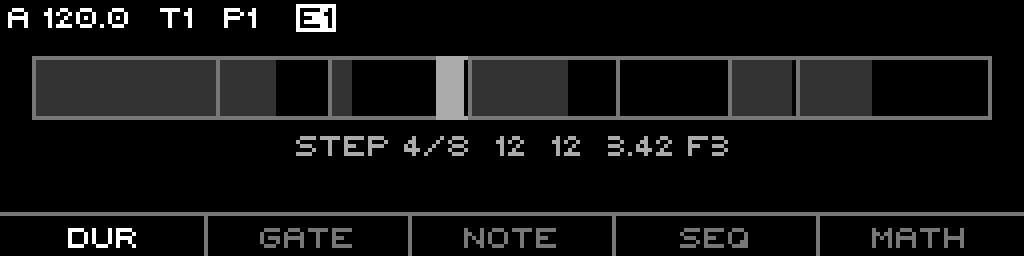
Page+S0 on an Indexed track opens INDEXED EDIT. The 48 steps are split into 3 sections of 16 (SectionCount = 3); the Left/Right keys move between sections, and the LED ring shows the selected section.
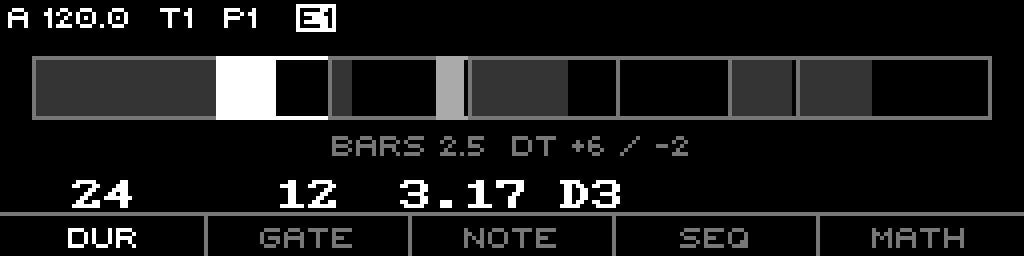
The top of the page is a timeline bar: each non-zero step is drawn as a block whose width is its duration and whose filled inner portion is its gate length. The currently playing step is medium-bright; selected steps are bright. Below the bar, an info line shows total bars and the delta to the nearest bar/beat boundary, plus the selected step's duration / gate / note (with note name and resolved volts).
[A]/[-] membership.Edit modes (F1-F3)
| Key | Mode | Encoder edits | Shift |
|---|---|---|---|
| F1 | DUR (Duration) | duration ±1 tick | ± divisor |
| F1 again | DUR-TR (Duration Transfer) | moves ticks from this step to the next (steal/give) | ± divisor |
| F2 | GATE | gate ±5 ticks | ±1 tick (fine) |
| F3 | NOTE | note ±1 degree | ± octave (chromatic scales) |
| F3 again | SLIDE | encoder toggles slide on the selection | — |
F1 and F3 are toggles: pressing them again while already in that mode flips into the transfer / slide sub-mode. Selecting a different mode clears those sub-modes.
Selecting and editing steps
- Step keys (S1-S16) select steps in the current section; multi-select is supported.
- Double-press a step toggles its gate between OFF and the minimum gate length.
- Encoder applies the active edit to all selected steps. With Shift + multiple steps selected, the encoder writes a linear ramp from the first to the last selected step (for note, duration, or gate).
Groups (F4 → GRPS)
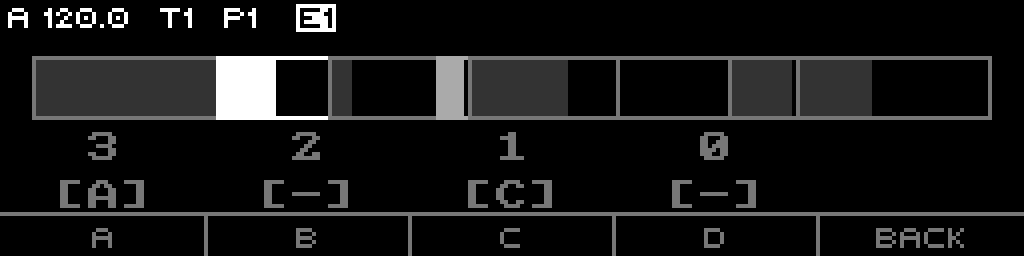
F4 cycles the context: Sequence → Step → Groups. In Groups mode the footer becomes A B C D, and F1-F4 toggle the selected steps' membership in groups A-D. With no steps selected, pressing a group key selects every step in that group. The page shows each group's member count and the focused step's membership.
Context menus (F4 = SEQ / STEP)
In Edit mode, F4 also flips the long-press context menu between Sequence scope and Step scope:
- Sequence menu: INIT (clear sequence), COPY, PASTE, GENER (run a generator into the active field — InitLayer / InitSteps / Euclidean / Random / Helical).
- Step menu: INSERT, MAKE 1ST (rotate so the selected step becomes step 1), DELETE, COPY, PASTE.
Footer F5 — Math / Routes
- F5 opens the Math page.
- Shift + F5 opens the Route Config page.
Quick-edit overlay (Page + S8-S16)
Holding Page lights the lower step row as a quick-edit strip:
| Step | Action |
|---|---|
| S8 | Split — hold and turn encoder to choose 2-8 pieces, release to split selected steps |
| S9 | Merge — hold and turn to choose how many following steps to fold into one |
| S10 | Swap — hold and turn to pick an offset, release to swap the selected step with the one that far ahead |
| S11 | Run Mode quick-edit |
| S12 | Piano voicing — hold and turn to pick a chord voicing, release to apply |
| S13 | Guitar voicing — same, guitar bank |
| S14 | (macro shortcut, see below) |
| S15 | inert |
Page + S4 / S5 / S6 / S14 open macro context menus directly (yellow LEDs):
- S4 Rhythm — Euclidean 3/9, Clave 5/20, Tuplet 7/28, Poly 3-5/5-7, M-TALA (each press alternates short/long cycle).
- S5 Waveform — TRI, 2TRI, 3TRI, 2SAW, 3SAW note contours.
- S6 Melodic — SCALE (asc/desc), ARP, CHORD, MODAL, M-MEL.
- S14 Duration/Transform — D-LOG, D-EXP, Q-MEAS (quantise to bars), REV, MIRR.
Macros act on the selected step range, or the whole active length if nothing is selected.
Part 4: Math
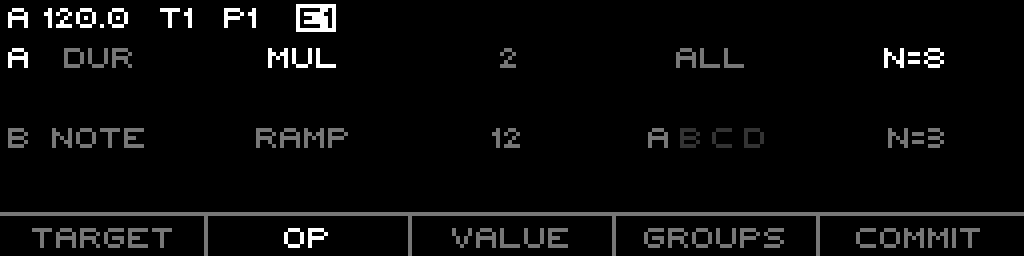
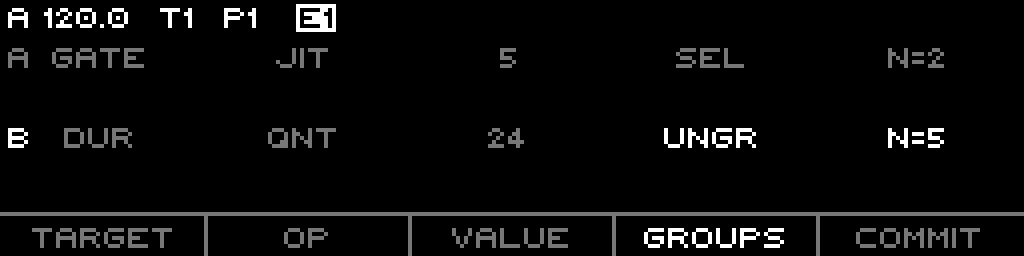
F5 on the edit page opens MATH — an offline transform applied to step fields. It holds two operation slots, A and B, both applied (A then B) when you commit. Math edits the stored steps; it is not a live modulation.
Per-slot config
Each slot (A/B) has four parameters, picked with F1-F4 (pressing the focused F-key again toggles between slot A and B):
| F-key | Param | Members |
|---|---|---|
| F1 | TARGET | DUR / GATE / NOTE |
| F2 | OP | ADD, SUB, MUL, DIV, SET, RAND, JIT, RAMP, QNT |
| F3 | VALUE | integer; range depends on op+target |
| F4 | GROUPS | which steps the op hits |
The encoder edits the focused param. The page shows N= the count of steps the slot's group selection currently affects.
The 9 operators
| Op | Effect |
|---|---|
| ADD | field + value |
| SUB | field − value |
| MUL | field × value |
| DIV | field ÷ value (value ≥ 1) |
| SET | field = value |
| RAND | field = random in 0..value |
| JIT | field += random in ±value |
| RAMP | linear ramp of value spread across the affected steps (first→last) |
| QNT | round field to nearest multiple of value |
Value ranges clamp to the target: duration/gate to 1023 ticks, note to −63..+64; MUL/DIV cap at 400. The Value step size honours Shift (×10 for MUL/DIV, ± divisor for duration, ±5 for gate, ± octave for note).
Group scope
GROUPS cycles A, B, C, D individually, the 1-15 combined masks, then UNGR (ungrouped steps only), SEL (the steps that were selected on the edit page when Math opened), and ALL. Default ALL.
Commit
F5 reads COMMIT when either slot changed; pressing it applies A then B to every matching step, then resets both slots. With no change, F5 / Shift+F5 just exits. (A hardware keyboard's Enter commits, Escape cancels.)
Part 5: Routes (live modulation)
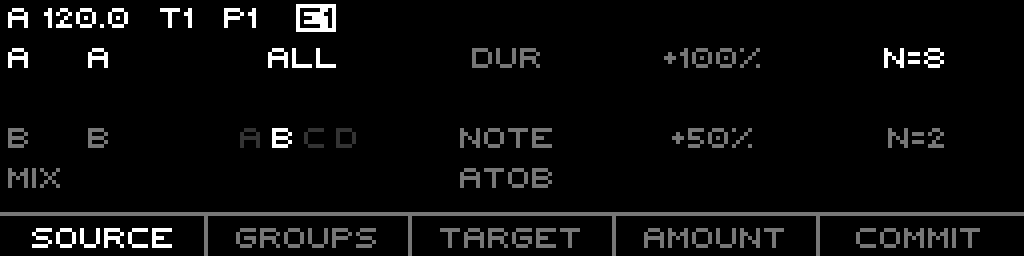
Shift+F5 on the edit page opens ROUTE CONFIG. Routes feed two external CV inputs — Indexed A and Indexed B — into step fields at play time, leaving the stored steps untouched. There are two route slots (Route A, Route B) plus a Mix mode.
Per-route config
Each route (A/B) has four parameters, picked with F1-F4 (re-pressing the focused F-key swaps between Route A and Route B):
| F-key | Param | Members |
|---|---|---|
| F1 | SOURCE | OFF / A / B — which CV input (Indexed A or Indexed B) drives this route |
| F2 | GROUPS | which steps the route modulates |
| F3 | TARGET | DUR / GATE / NOTE |
| F4 | AMOUNT | −200%..+200%, default +100% |
A route is active only when its source is not OFF and the step matches its group mask. The page shows N= affected steps. Left/Right moves focus between Route A, Route B, and Mix.
How modulation is applied
The two CV inputs (Indexed A / Indexed B) are routing targets fed from the global routing system (each −100..+100, scaled to ±1.0). At trigger time each active route scales its CV input by its amount and applies it to the chosen field:
- Duration — percentage scaling:
1.0 + modmultiplies the stored duration. - NoteIndex — 100% amount equals one octave in the current scale (modulation scaled by notes-per-octave).
- GateLength — additive tick offset.
Mix mode
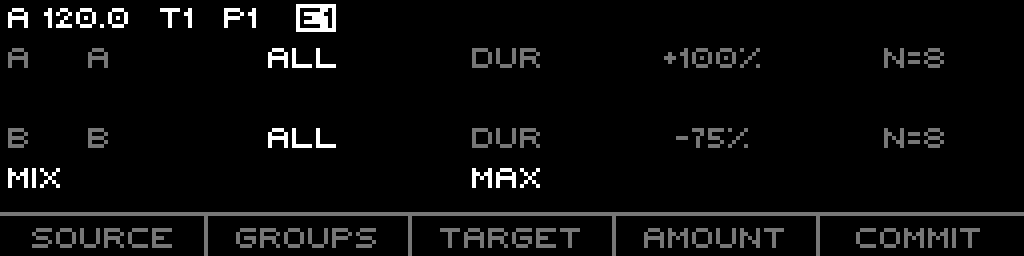
When both routes target the same parameter, the Mix mode (encoder to change) decides how the two contributions combine:
| Mode | Result |
|---|---|
| AtoB | sequential — both add (default) |
| MUX | average of A and B |
| MIN | min(A, B) |
| MAX | max(A, B) |
If the routes hit different fields, each is applied independently regardless of Mix.
Commit
F5 reads COMMIT when staged config differs from what's saved; pressing it writes Route A, Route B, and Mix into the sequence. Shift+F5 cancels. Routes are committed config, not auto-applied while you edit.
Part 6: Output & Voltage
Note resolution
A step's CV is computed by looking its noteIndex up in the active scale, after adding the track's octave (× notes-per-octave) and transpose (semitones). For chromatic scales the root note offset is added in volts. The sequence's scale/root override the project's; when set to default they fall back to the project scale group.
CV update mode
- Gate (default) — CV updates only on gated steps.
- Always — CV updates on every step, even silent ones, and keeps emitting CV while muted.
Slide
A step's slide flag, with the track Slide Time (0..100%), glides CV from the previous value to the new note over time instead of stepping. Slide Time 0 disables the glide even on slide steps.
Play mode
PlayMode (track param): Aligned (default) or Free — both advance by duration off the wallclock tick position; Aligned stays phase-locked to the transport.
Mute and activity
Muting gates the audible output (gate drops, and CV holds unless CV Update is Always). Activity reflects the pre-mute intended gate — whether the step would have gated — so a muted Indexed track still reports activity as a potential source for other tracks.
gateOutput() returns the post-mute gate (it ANDs in !mute() and the transport-running flag), while activity() returns the pre-mute intended gate. The two disagree while muted: activity reads true on a step that would gate, but the gate output is held low. This is the current behaviour as built.Part 7: Setup & Routing
Track-scope list (Page+S2)
Track-wide params, hosted by the Indexed track list:
- Play Mode (Aligned / Free; default Free)
- CV Update (Gate / Always; default Gate)
- Slide Time (0-100%; default 25%)
- Octave (−10..+10; default 0)
- Transpose (−60..+60; default 0)
Sequence-scope list (Page+S1)
Per-pattern params: Divisor, Clock Mult, Length, Active, Loop, Run Mode, Scale, Root Note, Scale Rotate, First Step, Sync, Reset Measure.
(Length appends/trims steps; Active sets the active step count directly — both read out the active length.)
What is routable
These Indexed params appear as routing targets:
- Sequence-scope: Divisor, Clock Mult, Scale, Root Note, First Step, Run Mode.
- Track-scope: Slide Time, Octave, Transpose.
- Modulation inputs: Indexed A and Indexed B — the two CV destinations the Route Config page reads. Route these from any routing source to drive duration / gate / note live.
Length, Active, Loop, Sync, Reset Measure, Scale Rotate, Play Mode, and CV Update are not routable.
The two reshaping systems at a glance
- Math (F5) — offline. Two op slots rewrite stored step fields on commit, group-scoped.
- Routes (Shift+F5) — live. Two CV inputs modulate duration / gate / note at play time, group-scoped, combined via Mix when they target the same field.