Note Track — manual
The core melodic sequencer. Sixteen steps per pattern, each a stack of per-step layers — pitch, gate, length, probability, retrigger, slide, condition — over sequence-wide scale/timing and track-wide octave/bias params.
2. Per-Step Layers
3. The Edit Page
4. Timing & Traversal
5. Accumulator & Harmony
6. Output & Recording
7. Setup & Routing
Introduction
The Note track is the most-featured track in xformer: every other track type borrows its timing, scale, and routing conventions from here. A Note step is not a single value — it is a stack of per-step layers edited one at a time, plus sequence-wide params (scale, run mode, divisor) and track-wide params (octave, transpose, slide time, biases). The engine reads all of them every tick to decide whether the gate fires, how long, at what pitch, and how often.
Everything here is grounded in the firmware as built — defaults, ranges, enum members, key bindings, and step-grid maps come from the model, engine, and UI code.
Prerequisites
- Familiarity with the xformer track/sequence/edit page model (Page+S2 / Page+S1 / Page+S0).
- Understanding of CV/gate concepts in modular synthesis (1V/oct, gate high/low).
- A grasp of the scale/root-note system — the Note track quantizes its output to a scale.
Part 1 · Overview
A Note track holds many patterns (plus snapshot slots). Each pattern is a NoteSequence of 16 Steps. The active pattern plays; its loop window (firstStep..lastStep) is read each clock division according to the run mode.
Three scopes of state:
- Per-step note, gate, gate prob, gate offset, slide, retrigger + prob, length + variation, condition, accumulator trigger, pulse count, gate mode, harmony overrides. One value per step, per layer.
- Sequence-wide scale group (scale/root/rotate), divisor, clock mult, reset measure, run mode, first/last step, traversal mode (Linear / Re:Rene / Ikra). One set per pattern.
- Track-wide play mode, fill mode, CV update mode, slide time, octave, transpose, rotate, and four probability/length biases. Shared across all patterns.
How a step plays
Every divisor boundary the engine advances the sequence state, picks the current step, then runs it through, in order: condition check → gate probability → gate-mode/pulse logic → retrigger subdivision → length → note evaluation (variation + accumulator + harmony) → scale quantization → slide. The gate and CV are scheduled into sorted queues and emitted at the right tick with swing applied.
Part 2 · Per-Step Layers
Steps are edited one layer at a time. The five function keys group the layers; pressing a function key again cycles to the next layer in that group. Shift+F1..F5 jump directly to the primary layer of each group (Shift+F4 instead resets the accumulator runtime value).
| Key | Label | Cycles through |
|---|---|---|
| F1 | GATE | Gate → Gate Probability → Gate Offset → Slide → (back) |
| F2 | RETRIG | Retrigger → Retrigger Probability → Pulse Count → Gate Mode → (back) |
| F3 | LENGTH | Length → Length Variation Range → Length Variation Probability → (back) |
| F4 | NOTE | Note → Note Var Range → Note Var Probability → Accumulator → Harmony layers → (back) |
| F5 | COND | Condition |
The F4 group's tail depends on the sequence's harmony role: master sequences expose Inversion then Voicing; follower sequences expose Harmony Role; off sequences loop straight back to Note.
The same 16-step grid stays on screen as you cycle layers; only the cell drawn under each gate box and the highlighted footer key change. The header label echoes the active layer.
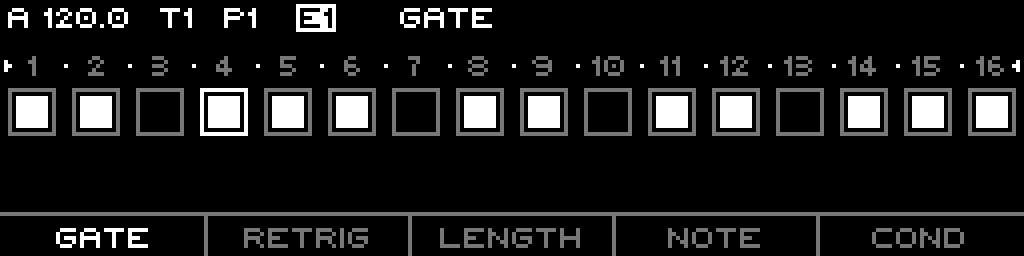
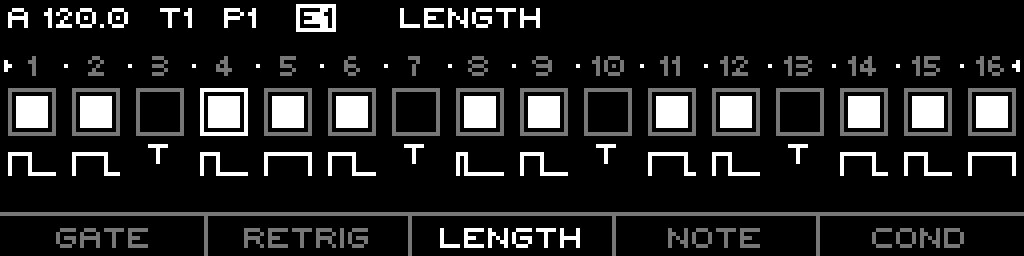
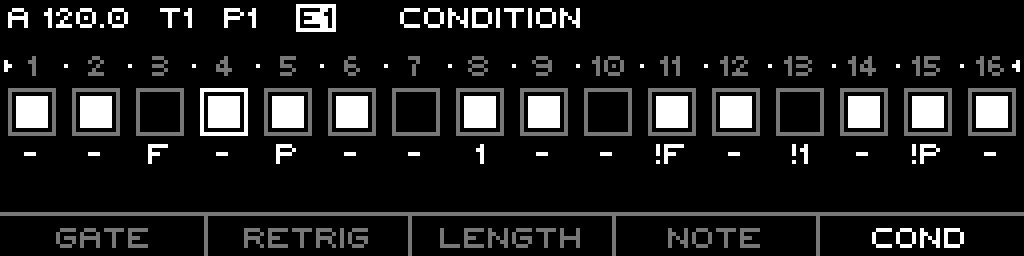
All per-step layers, defaults, ranges
Defaults are from Step::clear(). Ranges are the value-type bit widths.
| Layer | Default | Range | Notes |
|---|---|---|---|
| Gate | off | 0–1 | step fires or not |
| Gate Probability | 7 (100%) | 0–7 | chance the gate fires; biased by track Gate P. Bias |
| Gate Offset | 0 | 0–7 | delays the gate within the step (fraction of divisor); negative delay not yet allowed |
| Slide | off | 0–1 | glide CV from previous note over Slide Time |
| Retrigger | 0 | 0–3 | extra subdivided gates inside the step |
| Retrigger Probability | 7 (100%) | 0–7 | chance the retrigger count applies; biased by Retrig P. Bias |
| Pulse Count | 0 (1 pulse) | 0–7 | holds the step across N+1 divisor pulses |
| Gate Mode | 0 (All) | 0–3 | which pulses gate: All / First / Hold / FirstLast |
| Length | 3 (mid) | 0–7 | gate length as fraction of the division; 0 = trig (fixed 6 ms) |
| Length Variation Range | 0 | -7..+7 | random length spread; sign sets direction |
| Length Variation Probability | 7 (100%) | 0–7 | chance the length variation applies |
| Note | 0 (root) | -63..+63 | scale degree; quantized to the sequence scale |
| Note Variation Range | 0 | -63..+63 | random note spread; sign sets direction; biased by Note P. Bias |
| Note Variation Probability | 7 (100%) | 0–7 | chance the note variation applies |
| Condition | Off | see table | gate gating by fill / pre / first / loop count |
| Accumulator (ACCUM) | OFF | OFF / S / ±1..±7 | per-step accumulator drive (Part 5) |
| Harmony Role | SEQ | SEQ/Root/3rd/5th/7th/Off | follower-only per-step chord-tone override |
| Inversion | SEQ | SEQ/Root/1st/2nd/3rd | master-only per-step inversion override |
| Voicing | SEQ | always SEQ | feature dropped; reads back as SEQ |
T.Gate Mode and Pulse Count
Pulse Count holds one step across pulseCount + 1 divisor pulses. Gate Mode decides which of those pulses actually gate:
| Mode | Display | Fires on |
|---|---|---|
| 0 All | A | every pulse (default) |
| 1 First | 1 | first pulse only |
| 2 Hold | H | first pulse, one long gate spanning all pulses |
| 3 FirstLast | 1L | first and last pulse |
Conditions
The Condition layer gates the step on a runtime predicate. Pre/NotPre reference the previous conditional step's result; Fill references the fill state; First references iteration 0; Loop/NotLoop fire on every Nth loop with an offset.
| Condition | Short | Fires when |
|---|---|---|
| Off | - | always |
| Fill | F | fill active |
| !Fill | !F | fill not active |
| Pre | P | previous conditional step passed |
| !Pre | !P | previous conditional step failed |
| First | 1 | first iteration of the loop |
| !First | !1 | not the first iteration |
| Loop2..Loop8 | 2:1… | iteration matches base/offset cycle |
| !Loop2..!Loop8 | !2:1… | inverted loop cycle |
Note quantization
The stored Note value is a scale degree (-63..+63, 0 = root). The engine adds octave + transpose, optional note variation, optional accumulator offset, optional harmony, then converts to volts through the selected scale. Chromatic scales add the root note as a 1/12 V offset; non-chromatic scales fold root into the scale lookup.
Part 3 · The Edit Page
Page+S0 (with the track selected) opens the STEPS edit page. The 16-step keypad maps to the current loop section; Left/Right move between four sections.
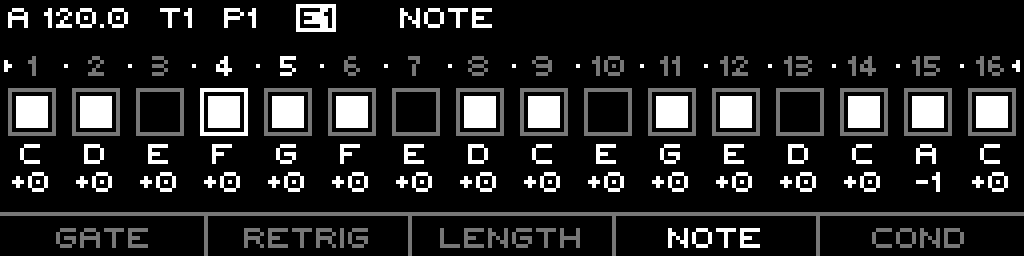
F-keys, encoder, Shift
- F1–F5 switch/cycle the active layer. The active function is shown in the header.
- Encoder edits the selected step(s) on the current layer. On Note/Note-Range layers, Shift + encoder jumps by a full octave (chromatic scales only).
- Encoder press toggles the gate of the selected steps (off if all selected are on, else on).
- Shift+F4 resets the accumulator runtime value (shows "ACCUM RESET").
Step keypad behaviour
- Tap a step (Gate layer) toggles its gate.
- Double-tap a step (any non-Gate layer) toggles its gate without leaving the layer.
- Hold a step + tap another range-selects; the encoder then edits all selected steps.
- Hold a step + F1–F5 sets that step's note to octave 1–5 (quick octave set).
- Shift + Left/Right shifts the selected steps (or the whole loop) left/right by one.
LED colours
- Current playing step: red.
- Selected steps: red + green (always green when selected).
- Gate layer: lit green where the step gate is on.
- Accumulator layer: lit green where the step has an accumulator trigger.
- Other layers: green follows the gate state.
- The four section LEDs show the selected sequence section.
- Holding Page (no Shift) lights S9–S16 green for the available quick-edit slots.
Context menu (long-press)
| Item | Action |
|---|---|
| INIT | clear all steps to default |
| COPY | copy selected steps to the clipboard |
| PASTE | paste steps from the clipboard (enabled only if clipboard holds note steps) |
| DUPL | duplicate the loop, extending Last Step |
| GEN | open the generator (Init Layer / Init Steps / Euclidean / Random / Algo) |
Part 4 · Timing & Traversal
Per-sequence timing params
| Param | Default | Range | Notes |
|---|---|---|---|
| Divisor (Div X) | 12 | 1–768 | clock ticks per step |
| Clock Mult | 100 (1.00x) | 50–150 | scales the effective divisor |
| Reset Measure | 0 (off) | 0–128 bars | re-syncs the sequence every N bars |
| Run Mode | Forward | see below | traversal order |
| First Step | step 1 | step 1–64 | loop window start |
| Last Step | step 16 | step 1–64 | loop window end |
| Mode | Linear | Linear / Re:Rene / Ikra | traversal engine |
Run modes
Types::RunMode: Forward, Backward, Pendulum, PingPong, Random, Random Walk.
Play mode (track-wide)
- Aligned (default) — steps advance on divisor boundaries phase-locked to the master clock; pulse-count and retriggers are honoured.
- Free — the step index is computed from the free-running clock position; allows Re:Rene and Ikra traversal.
Traversal modes (Mode)
- Linear — standard single-sequence playback.
- Re:Rene — an 8×8 X/Y grid walk (Free play mode only). X and Y advance on their own divisors; the Y divisor can be driven by another track's gate (Div Y Source = Gate, Div Y Track = T1..N). Steps outside first/last are skipped.
- Ikra — a second independent note loop (Note First/Note Last) advances on its own Div N divisor while the rhythm loop advances on Div X, so pitch and rhythm phase against each other.
Part 5 · Accumulator & Harmony
Accumulator
The accumulator adds a drifting offset to note pitch. It is a sequence-wide engine (enabled, min/max bounds, step value, direction, order) plus a per-step trigger value on the ACCUM layer:
OFF(--) — step does not drive the accumulator.S— step uses the sequence's global step value.±1..±7— step overrides the step value (and sign flips direction) for that tick.
Trigger modes (sequence-wide) decide when the accumulator ticks: per Step (once per step, first pulse), per Gate (each gating pulse), or per Retrigger (each subdivision). Mode Stage applies the offset only to triggered steps; Track applies the current value to every step. Shift+F4 on the edit page resets the runtime value to its floor.
Defaults: step value 1, min 0, max 7, with Mode Track, Polarity Unipolar, Direction Up, Order Wrap, Trigger Step (enabled).
Harmony
A Note sequence has a harmony role: Off, Master, or one of four Follower roles (Root/3rd/5th/7th). A follower watches a master track (another Note track) and harmonizes the master's current note into a chord, then plays the chord tone for its role.
- Master settings: harmony scale/mode (0–6), inversion (0–3), voicing (0–3), transpose (±24 semitones). Per-step Inversion override available on the master.
- Follower: follows
masterTrackIndex(0–7); role is the chord tone it plays. Per-step Harmony Role override available on the follower.
Part 6 · Output & Recording
CV update mode (track-wide)
- Gate (default) — CV updates only on gating steps.
- Always — CV updates every step even when the gate is muted.
Slide
Slide Time (track-wide, 0–100%) sets the glide time. A step's Slide flag makes the CV ramp from the previous note toward the new note over that time; without slide the CV jumps.
Fill (track-wide)
Fill Mode: None / Gates / Next Pattern / Condition. Fill replaces gates, swaps in the next pattern's sequence, or activates Fill-conditioned steps while fill is held. Fill Muted controls whether fill still applies when the track is muted.
Live & step recording
- Live recording captures incoming MIDI/CV into steps quantized to the divisor, writing gate, note, and length; in Overwrite record mode, ungated steps in the played window are cleared.
- Step recording advances a record cursor; played notes write one step at a time.
- Monitoring — selecting a step on the Note layer (when stopped) sounds it; live MIDI input can be monitored per the project monitor mode.
Part 7 · Setup & Routing
Track-scope list (Page+S2)
Track-wide params, hosted by the generic Track page (NoteTrackListModel):
| Param | Default | Range |
|---|---|---|
| Play Mode | Aligned | Aligned / Free |
| Fill Mode | None | None / Gates / Next Pattern / Condition |
| Fill Muted | no | yes/no |
| CV Update Mode | Gate | Gate / Always |
| Slide Time | 0% | 0–100% |
| Octave | 0 | -10..+10 |
| Transpose | 0 | -100..+100 (routed range -60..+60) |
| Rotate | 0 | -64..+64 |
| Gate P. Bias | 0 | -7..+7 (shown ±%) |
| Retrig P. Bias | 0 | -7..+7 |
| Length Bias | 0 | -7..+7 |
| Note P. Bias | 0 | -7..+7 |
Sequence-scope list (Page+S1)
Per-pattern params (NoteSequenceListModel); rows shown depend on Mode:
- Linear: Mode, First Step, Last Step, Run Mode, Div X, Clock Mult, Reset Measure, Scale, Root Note, Scale Rotate.
- Re:Rene adds: Div Y, Y Src, Y Trk.
- Ikra adds: Note First, Note Last, Div N.
The quick-edit overlay (Page + S9–S16 on the edit page) exposes, in order: First Step, Last Step, Run Mode, Div X, Reset Measure, Scale, Root Note.
What is routable
Track-scope routing targets:
SlideTime,Octave,Transpose,RotateGateProbabilityBias,RetriggerProbabilityBias,LengthBias,NoteProbabilityBias
Sequence-scope routing targets:
FirstStep,LastStep,RunMode,Divisor,ClockMult,Scale,RootNote
Per-step layers (note, gate, length, condition, etc.) are not routable — they are step data, edited on the grid, not modulation targets.