XFORMER Routing
The routing system is a modulation matrix: any source — a CV input, a bus, a modulator, a MIDI message — can drive any target: a track or sequence param, a play-state action, the transport, a global setting, or a CV bus. Routing is modulate-around-a-base, not overwrite — a route adds an offset on top of the value you set on the param's own page, so params stay editable while routed.
2 · The three apply models
3 · The tab editor
4 · Sources
5 · Target families
6 · Play-state & global transport
7 · BUS & CV router
8 · MIDI routing
1 · Overview
A route is a wire from one source to one target. Up to 16 routes exist at once. The signal chain is always the same: a normalized source value is scaled, shaped, and combined, then applied to the target according to the target's apply model.
The defining property is modulate-around-a-base. A route does not replace the value you dial on a param's own page — it adds a modulation offset on top of that base. Your hand-set value stays live and editable; routing sweeps around it. This is the core difference from legacy Performer routing, which replaced the value outright.
2 · The three apply models
A route reaches its target through one of three paths. The target decides which — you don't pick the model, the param you aim at determines it.
2.1 Override (base + delta) continuous params
For continuous per-track and global params — Transpose, Scale, Divisor, Octave, Tempo. The route turns the source into a delta: scaled by the route's depth %, bent by its shaper, and combined per its combine mode. The effective value is your base plus that delta, clamped to the param's range. Your hand-set base is preserved — routing modulates around it.
- Combine = Modulate default — the delta is centered: the source sweeps the param up and down around the base.
- Combine = Absolute — the source sweeps the param across its full range from the base upward, a one-directional sweep.
- scale source — an optional second source that dynamically scales the route's depth — a VCA on
the modulation amount.
None= fixed depth.
2.2 Trigger (raw source) actions & transport
Run and Reset, plus the five global transport actions (Play, Play-Toggle, Record, Record-Toggle, Tap-Tempo), read the raw normalized source only:
- Run — threshold (on above ~0.55, hysteresis-friendly).
- Play / Record — level-following: transport / record state mirrors the source level.
- Reset / Play-Toggle / Record-Toggle / Tap-Tempo — fire on a rising edge.
2.3 Bus (sum-then-clamp) CV buses
Sources routed to a CV bus sum into the bus, clamped ±5 V, so several modulators can feed one bus. Bus routes are created on the dedicated BUS tab, not the param bands. A bus routing to itself is blocked; cross-bus feedback (bus1→bus2→bus1) is allowed — it is bounded and behaves like patching a CV output back to an input.
3 · The tab editor
The routing page is a tab editor: a ring of tabs across the top, each showing a column of param rows × 8 track cells.
| Tab | What it holds |
|---|---|
| Fixed bands | Pitch, Clock, Global — the cross-engine params grouped by concept. |
| Engine pages | One per track mode: that engine's own routable params. |
| BUS | The four CV bus lanes. |
| MIDI | The learned MIDI routes. |
3.1 The three fixed bands
- Pitch — Scale, Root Note, Transpose, Octave, Slide Time, Rotate.
- Clock — Divisor, Clock Multiplier, Run, Reset, Play, Play-Toggle, Record, Record-Toggle, Tap-Tempo, Mute, Fill, Fill Amount, Pattern. (Clock plus all per-track and global transport / play-state.)
- Global — Tempo, Swing, CV-Router Scan/Route, CV-Output Rotate, Gate-Output Rotate.
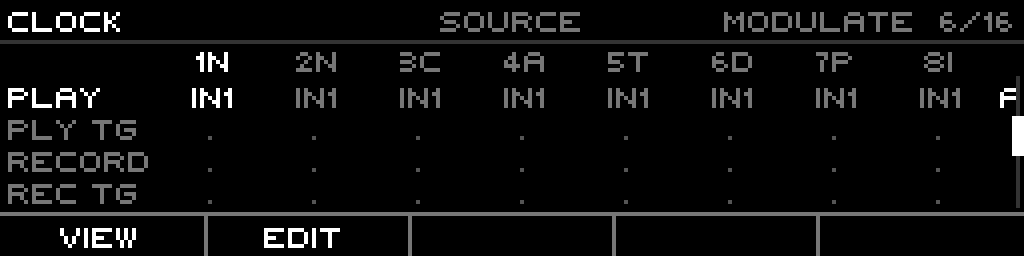
The Clock band. The transport rows (Play / Toggle / Record / Tap) are source-only global rows — no per-track cells, no depth.
3.2 Rows: per-track vs global
- Per-track rows show 8 track cells. A track is a member of the route when its cell has a non-zero depth. Membership is implicit — dial a cell's depth up to add the track, down to 0 to drop it.
- Global rows (project and engine-scope targets: Tempo, Swing, Play, Record) have no per-track dimension — one shared value shown across the columns.
3.3 Views
Cycle with VIEW (F1): SOURCE → DEPTH → SCALE → SHAPER → SOURCE.
- SOURCE — which source drives the row (one source per row).
- DEPTH — per-track depth % (membership plus amount).
- SCALE — the row's scale source (dynamic depth gain).
- SHAPER — the row's response curve (fold / crease variants).
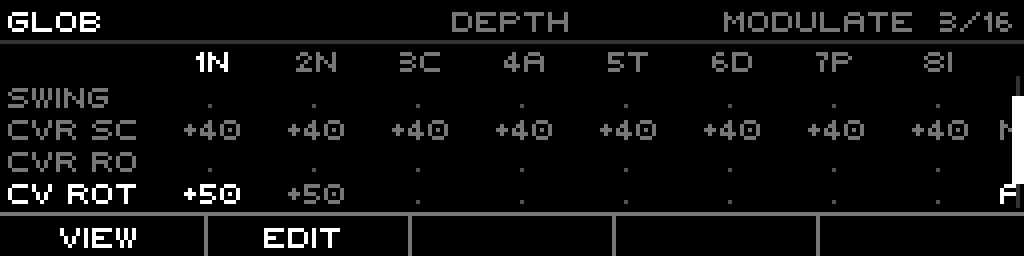
Global band, DEPTH view.
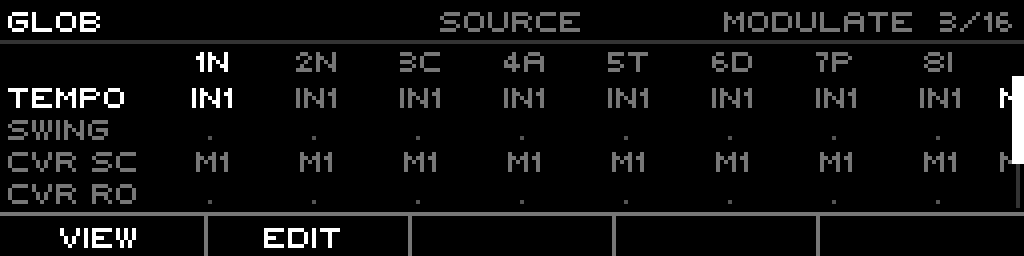
SOURCE view — the source abbreviation feeding each row.
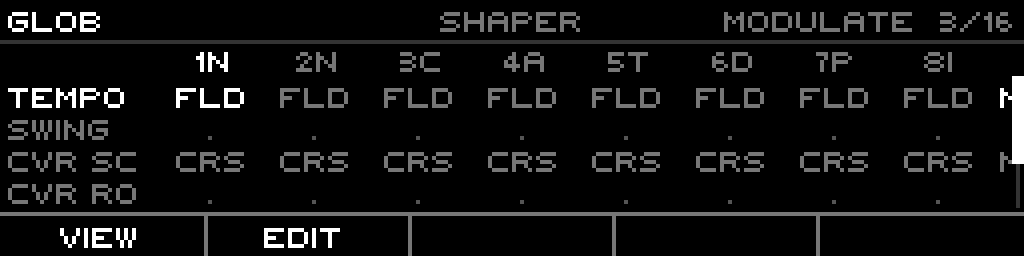
Global band, SHAPER view — the fold / crease response curve per row.
3.4 Editing a route
- Move the cursor to a row, EDIT (F2) to open the draft.
- SOURCE view + encoder picks the source; DEPTH view + encoder dials the cell's depth.
- COMBINE (F3) toggles Modulate ↔ Absolute.
- COMMIT (F5) writes the draft to the live route; CANCEL (F4) discards it.
3.5 MOD+ / MOD− inline setup
From a track or sequence param page you can add modulation to the param under the cursor without opening the routing page:
- MOD+ creates a route for that param, or extends the existing one onto the current track. One route per param — extra tracks are added to it, not minted as a second route.
- MOD− removes the current track from the param's route, freeing the route when its last track is dropped.
4 · Sources
Every route picks one primary source. The source abbreviations shown in the SOURCE view:
| Token | Source |
|---|---|
IN1–4 | CV inputs |
O1–8 | CV outputs |
B1–4 | CV buses |
G1–8 | Gate outputs |
M1–8 | Modulators |
| MIDI | configured on the MIDI tab |
None | inert — a route with no source does nothing |
A route's scale source picker offers the same list minus MIDI, minus the route's own primary source (no self-squaring), and minus any self-routing bus.
5 · Target families
Each target belongs to a family that fixes its apply model and scope:
| Family | Examples | Apply model | Scope |
|---|---|---|---|
| Pitch / structural | Scale, Root Note, Transpose, Octave, Slide Time, Rotate | override | per-track |
| Clock | Divisor, Clock Multiplier | override | per-track |
| Transport (per-track) | Run, Reset | trigger | per-track |
| Transport (global) | Play, Play-Toggle, Record, Record-Toggle, Tap-Tempo | trigger | global |
| Play-state | Mute, Fill, Fill Amount, Pattern | level-driven | per-track |
| Global | Tempo, Swing, CV-Router Scan/Route, CV/Gate-Output Rotate | override | project |
| Bus | Bus CV 1–4 | sum-then-clamp | — |
| Per-engine | each track mode's own params (Algorithm, Chaos, Fractal, Stochastic, DiscreteMap inlets, Indexed A/B) | override | per-track |
6 · Play-state & global transport
6.1 Play-state targets Mute / Fill / FillAmount / Pattern
Per-track and level-driven: re-evaluated each frame and idempotent.
- Mute / Fill — threshold 0.5.
- Fill Amount — source scaled to 0..100.
- Pattern — source scaled to the rounded pattern index (0..15); inert while a snapshot is active.
6.2 Global transport
The engine consumes these directly. Play and Record follow the source level; Play-Toggle, Record-Toggle and Tap-Tempo fire on a rising edge.
7 · BUS & CV router
Four CV bus lanes. Each lane shows its live bipolar volts, its one feeding route (source + depth), and CVR / TT activity lights. Buses are a mixing node — multiple routes sum into one bus, clamped ±5 V.
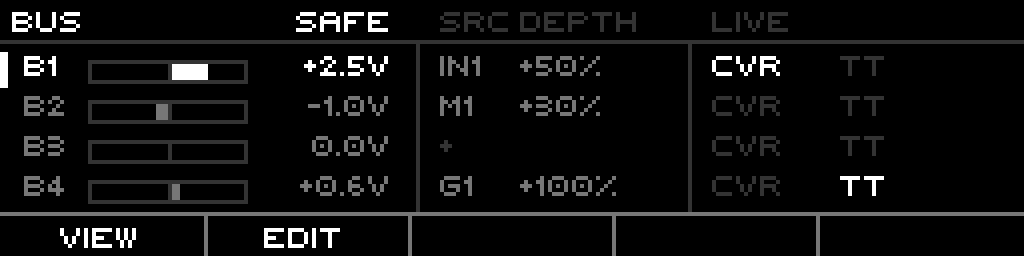
The BUS tab — four lanes, live volts, source + depth per lane, CVR / TT lights.
The independent interpolating CV router is a 4×4 matrix with Scan / Route targets that can also feed the buses.
8 · MIDI routing
A route whose source is MIDI is configured on the MIDI tab — port, channel, event, and CC-or-note. MIDI-learn assigns an incoming message to a route.