Stochastic Track — manual
A probabilistic note engine. Two independent domains — rhythm and melody — each roll fresh (Live) or replay a shaped snapshot (Loop), with bursts, articulation, and per-cycle evolution.
2. Modes — Live & Loop
3. The Rhythm Roll
4. The Melody Roll
5. Burst Clusters
6. Per-Cycle Evolution
7. Playback & Timing
8. The Edit Page
9. Setup & Routing
Introduction
The Stochastic track rolls notes from weighted distributions instead of storing fixed steps. Two independent domains run side by side — rhythm (timing, gate, articulation) and melody (pitch). Each runs in one of two modes: Live (re-rolled fresh every trigger) or Loop (a captured snapshot that gets thinned, masked, and slowly mutated). Over the roll sit per-cycle evolution knobs — patience, mutate, jump, sleep — that let the pattern drift.
Everything here is grounded in the firmware as built — defaults, ranges, enum members, key bindings, and step-grid maps come from the model, engine, and UI code.
Prerequisites
- Familiarity with the xformer track/sequence/edit page model (Page+S2 / Page+S1 / Page+S0).
- Understanding of CV/gate and the 1V/oct scale-degree model.
- A grasp of probability-as-percent: most controls are 0-100% likelihoods, not absolute values.
Part 1 · Overview
A Stochastic track has no hand-drawn step data. Instead it:
- Rolls an event each trigger — a duration, a pitch, and articulation flags — from the distributions you set.
- Runs two domains independently: rhythm (duration / gate / rest / slide / legato / burst) and melody (scale degree + octave).
- Evolves the pattern at each cycle boundary — patience regeneration, one-step mutation, octave jumps, stochastic sleep.
Each domain runs in one of two modes:
- Live the domain re-rolls a fresh event on every trigger. Nothing is stored; the pattern never repeats unless you freeze it.
- Loop the domain rolls one seeded snapshot into the step buffer, then replays it — thinned (mask/tilt), mutated, and regenerated on a patience timer.
The two domains' modes are set separately, so you can run Live rhythm under Loop melody, or any other split.
Part 2 · Modes — Live & Loop
Per-domain mode
Rhythm and melody each carry their own source mode (Live or Loop). Setting both equal reads back as "Live" or "Loop"; setting them differently reads as "Split".
| Domain | Live | Loop |
|---|---|---|
| Rhythm | re-rolls duration/rest/slide/legato/burst every trigger | one seeded snapshot, replayed and shaped |
| Melody | re-rolls scale degree + octave every trigger | one seeded snapshot, replayed and shaped |
In Live mode the slide and legato flags on stored events are dead — the engine's playback cache owns those picks per trigger. The Loop-only shaping params (mask/tilt for both domains) are inert in Live.
When Loop content regenerates
A Loop domain holds its snapshot until one of these fires:
- Patience — a Poisson-timed roll at cycle-end marks the domain invalid; it regenerates with a fresh seed on the next trigger.
- NewR / NewM — manual renew (F-key) draws a fresh seed and rebuilds the domain.
- Mutate — destructively re-rolls one random step inside the window at cycle-end.
- Pattern change — clears queues and rebuilds.
Capture: freezing a Live roll into a Loop
NewR / NewM is mode-aware:
- In Live mode, a single press captures the most-recently-played event into the stored buffer and flips the domain to Loop — the live phrase becomes the loop.
- In Loop mode, NewR/NewM renews (double-press guarded) — rolls a new seed. Shift undoes the last renew.
Part 3 · The Rhythm Roll
Each rhythm event is a duration plus articulation. The roll draws from duration tickets, then applies rest/slide/legato probabilities and an optional burst cluster.
Duration and tickets
The duration LUT (kStochasticDurationLut) has 8 slots, each a fraction of the clock divisor. Labels shown at divisor = 1/16:
| Slot | Multiplier | Label @ 1/16 |
|---|---|---|
| 0 | ×8 | 1/2 |
| 1 | ×4 | 1/4 |
| 2 | ×3 | 3/16 |
| 3 | ×2 | 1/8 |
| 4 | ×4/3 | 1/8T |
| 5 | ×1 | 1/16 (= divisor) |
| 6 | ×2/3 | 1/16T |
| 7 | ×1/2 | 1/32 |
Labels are redrawn from the live divisor, so they track clock changes instead of lying.
- Note Duration (
noteDuration, slot 0-7, default 5 = ×1, routable) — the home slot the duration bell centres on. - Variation (
variation, 0-100%, default 16, routable) — spread away from the home slot. 0 locks to the home bell; 50 hands weight to the tickets; 100 explores the mirror slot. - Duration tickets (per slot: -1 exclude / 0 default / 1-100 weight) — emphasis per LUT slot, edited on the DURATION page.
Rest, slide, legato, gate length
- Rest (
rest, 0-100%, routable) — per-event chance the event is silent. - Slide Prob (
slide, 0-100%, routable) — per-event chance the note slides (glide time set by track Slide Time). - Legato (
legatoProb, 0-100%) — per-event chance the gate ties into the next. - Gate Length (
gateLength, 0-100%, routable) — spread of gate length around a fixed 50%-of-duration centre. 0 = exactly 50% every event; 100 = triangular spread 10..100% peaked at 50%. Floored at 10% of duration and at an absolute audible-tick minimum.
Patience (rhythm)
Patience R (patienceRhythm, 0-100%, routable) is a boredom timer. Knob 0-99 maps to a Poisson rate; the engine rolls a Poisson CDF against how many cycles the loop has survived, and when it fires the rhythm domain regenerates with a fresh seed. Knob 100 = off. Loop-mode only.
Mask and Tilt (rhythm, Loop-only)
These thin a Loop snapshot by duration rank — they don't change the roll, they sieve it at playback.
- MaskR (
maskRhythm, 0-100%, default 100 = bypass, routable, routing name "Mask") — rank filter on duration. Below 50, long notes survive; above 50, short notes survive. - TiltR (
tiltRhythm, 0-100%, centre 50, routable, routing name "Tilt") — blends the duration-rank axis with a per-cell salt hash. The engine recovers a signed magnitude as (knob − 50): 50 = pure salt cut, below 50 = negative rank-cut, above 50 = positive rank-cut.
Both are inert in Live rhythm.
Part 4 · The Melody Roll
Melody rolls a scale degree and octave through a five-step pitch law: pick a degree class with a recency penalty, build an octave field, then place the pitch through a Marbles-style bell and a contour nudge.
Degree tickets and rotation
- Degree tickets (per degree: -1 exclude / 0 default / 1-100 weight) — per-degree likelihood, edited on the PITCH page.
- Degree Rotation (
degreeRotation, -32..+32) — rotates which degree the tickets attach to (DROT on the PITCH page). - Mask Rotation (
maskRotation, -32..+32) — rotates the non-excluded ticket weights among themselves (MROT on the PITCH page).
The Marbles-style pitch bell
- Bias (
marblesBias, 0-100%, default 50, routable) — centre of pitch attraction within the field. - Spread (
marblesSpread, 0-100%, default 50, routable) — shape: concentrated, uniform, or pulled to the edges. - Shape (
marblesMode, Off/On) — legacy toggle; the engine runs the distribution regardless.
Field, contour, complexity, range
- Range (
range, 0-100%, centre 50, routable) — field width. 50 = single octave; above 50 widens the candidate set up to 4 octaves; below 50 keeps a single octave but adds a per-slot octave-displacement chance. - Contour (
contour, -100..+100%, routable) — directional drift. The roll probabilistically swaps toward a candidate that moves up (positive) or down (negative). - Complexity (
complexity, 0-100%, default 50, routable) — how aggressively a repeated degree class is rejected and re-rolled.
Mask and Tilt (melody, Loop-only)
These sieve a Loop snapshot by pitch centrality (how tonal the degree is — root, fifth, thirds rank high).
- MaskM (
maskMelody, 0-100%, default 100 = bypass) — passes pitches whose centrality clears the threshold (high-centrality survives). - TiltM (
tiltMelody, 0-100%, default 0) — inverts the filter: passes low-centrality pitches. The two act as an OR union.
Both inert in Live melody.
Repeat
Repeat (repeatProb, 0-100%) — per-trigger chance to freeze and replay the previous event verbatim (note, octave, duration, articulation). 100% holds on the last event; mid values cluster durations like a human player. Works in both modes. No routing target.
Patience (melody)
Patience M (patienceMelody, 0-100%) — the melody domain's own boredom timer, same Poisson-CDF behavior, independent of Patience R. Knob 100 = off. No routing target. When it fires it also resets the octave-jump register.
Part 5 · Burst Clusters
A burst replaces one event with a short cluster of notes packed into that event's duration. The cluster is rolled per event.
- Burst (
burst, 0-100%, default 0, routable) — per-event chance a cluster fires. - Burst Count (
burstCount, 0-100%, routable) — picks the number of cells (2..8) by triangular weight. Stored as tails = total − 1. - Burst Rate (
burstRate, 0-100%, routable) — picks the spacing denominator (2..6) by triangular weight.
| Burst Hold | Pitch axis | Timing axis |
|---|---|---|
| Hold/Fit | cells share the anchor's pitch | pack into one duration on the BurstRate curve |
| Hold/Over (default) | cells share the anchor's pitch | uniform spacing, may overflow the duration |
| Roll/Fit | each cell rolls its own pitch | pack into one duration |
| Roll/Over | each cell rolls its own pitch | uniform spacing, may overflow |
kMinBurstParentTicks (96 ticks) the parent event is too short to host a cluster and burst count auto-clips to 0. The Burst readout appends * when the current Note Duration + divisor combo can't produce an audible burst, so you can see why the knob is inert.Part 6 · Per-Cycle Evolution
At each cycle boundary — a natural pattern wrap or a preempted reset-measure — four hooks fire in lockstep.
- Patience (R and M) — the Poisson regeneration rolls described above.
- Mutate (
mutate, 0-100%, routable) — chance to destructively re-roll one random step inside the window. Picks rhythm or melody (or both if both are Loop+valid), then rebuilds the mask ranks. - Jump (
jump, 0-100%, routable) — chance of a ±1 octave walk, reflected at ±2 octaves. Applied as a playback-time register offset; stored events are never touched. - Sleep (
sleep, 0-100%, routable) — sets a skip counter:(knob × 4 + 5) / 10steps are silently skipped before play resumes.
Part 7 · Playback & Timing
The sequence window
- Size (
size, 2..CONFIG_STEP_COUNT, default 32) — steps in the pattern. Last is collapsed into Size (last = size − 1). - First (
first, 0..size−1) — the start step. - Rotate (
rotate, -64..+64, routable) — rotates the read position within the window. - Play Mode (track, Aligned / Free) — how the window aligns to the clock.
Clock
- Clock/Div (
divisor, default 12) — base tick spacing. - Clock Mult (
clockMultiplier, 50-150%, default 1.00x, routable) — fine clock scaling. - Reset Measure (
resetMeasure, off / 1..128 bars, default off) — snaps the read position back to First on the bar boundary.
The effective tick spacing is the divisor scaled by the PPQN ratio (CONFIG_PPQN / CONFIG_SEQUENCE_PPQN = 4) and divided by the clock multiplier.
Feel
Feel (feel, 0-100%, centre 50, default 50, routable) bends the cycle toward a different beat count. The detent 45..55 is off (no scaling). Below 50 lerps the cycle toward 3 beats; above 50 toward 5 beats. Computed per trigger so routed Feel takes effect immediately; scaling clamps to ¼×..4×.
Output: octave, transpose, slide, CV update
- Octave (track, -10..+10, routable) and Transpose (track, -100..+100, routable) are added at trigger time. The jump-walk register adds on top of Octave.
- Slide Time (track, 0-100%, routable) sets the glide rate for sliding notes.
- CV Update (track, Gate / Always) — Always updates pitch even on rests; Gate updates pitch only when the gate is on.
Part 8 · The Edit Page
Page+S0 opens the Stochastic edit page. F5 (NEXT) cycles four layers: LIVE → LOOP → PITCH → DURATION → LIVE. The first two are the hands-on knob-grid pages (each step holds one shaping param); the last two edit the degree and duration tickets.
On every layer, hold a step (or several) and turn the encoder to edit. Shift multiplies the encoder delta by 10. A single held step shows its full name + value at the top; more than one held shows "MANY SELECTED". The context menu (long-press) offers INIT / EVEN / RAND / BPITCH — behavior is per-page.
LIVE page
The performance knob grid. Footer F-keys: rhythm-mode toggle, melody-mode toggle, NewR, NewM, NEXT.
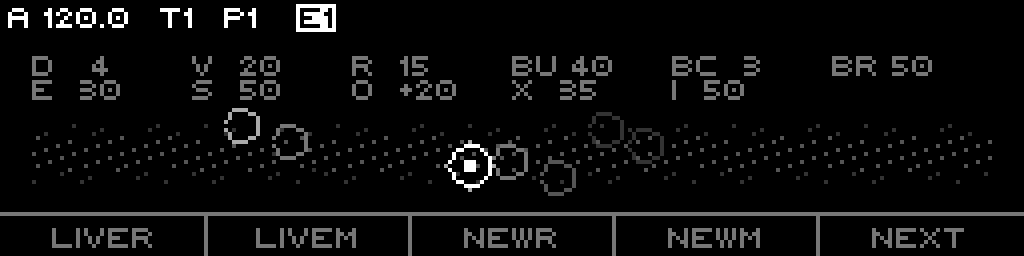
LiveR / LiveM / NewR / NewM / NEXT.- F1
LoopR/LiveR— toggle rhythm mode Live↔Loop. - F2
LoopM/LiveM— toggle melody mode Live↔Loop. - F3
NewR(ShiftUndoR) — capture-or-renew rhythm (mode-aware); Shift undoes last renew. - F4
NewM(ShiftUndoM) — capture-or-renew melody; Shift undoes last renew. - F5
NEXT— next page.
| Step | Param | Step | Param |
|---|---|---|---|
| S1 | Note Duration | S9 | Complexity |
| S2 | Variation | S10 | Contour |
| S3 | Rest | S11 | Bias |
| S4 | Feel | S12 | Spread |
| S5 | Gate Length | S13 | Range |
| S6 | Legato | S14 | Slide |
| S7 | Burst | S15 | Repeat |
| S8 | Burst Count | S16 | Burst Rate |
LEDs: rhythm + articulation + repeat (S1-S6, S15) red; pitch shape (S9-S14) green; burst (S7-S8, S16) orange; a held step adds the opposite colour (amber).
Context menu: INIT resets all 16 knobs to defaults; RAND randomizes them (or the held selection); BPITCH cycles Burst Hold (Hold/Over → Roll/Over → Hold/Fit → Roll/Fit). EVEN is not used on LIVE. Quick-edit: Page + S16 fires RAND directly.
LOOP page
The Loop-shaping and evolution grid. Footer F-keys mirror LIVE (rhythm/melody toggles, NewR, NewM, NEXT).
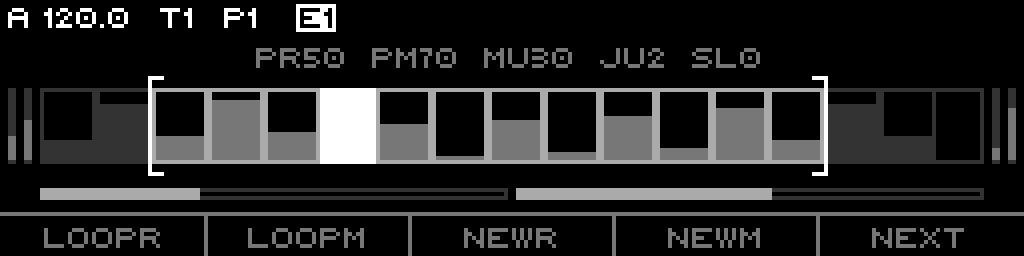
first..last play window, the bright slot is currently audible, bar height encodes pitch. Two patience meters fill below; side bars are Mask/Tilt per domain. Footer reads LoopR / LoopM / NewR / NewM / NEXT in Loop mode.| Step | Param | Step | Param |
|---|---|---|---|
| S1 | Patience R | S9 | First |
| S2 | Patience M | S10 | Size |
| S3 | Mutate | S11 | Rotate |
| S4 | Jump | S15 | Mask R |
| S5 | Sleep | S16 | Tilt R |
| S7 | Mask M | ||
| S8 | Tilt M |
(S6, S12-S14 unbound.) First and Size trigger an engine window-sync; Rotate does not.
LEDs: patience + walk (S1-S5) red; Mask/Tilt Melody (S7-S8), window (S9-S11), Mask/Tilt Rhythm (S15-S16) green; held step adds amber. Context menu: INIT resets patience/mutate/jump/sleep/window/masks/tilts (selection-aware). EVEN and RAND are not used on LOOP.
PITCH page
Scale-degree tickets. Header SCALE TICKETS. Each step S1-S16 selects a degree (degree index = bank × 16 + step); the encoder edits that degree's ticket (or all held degrees). A single held degree reads DEG n: <weight or EXCL>.
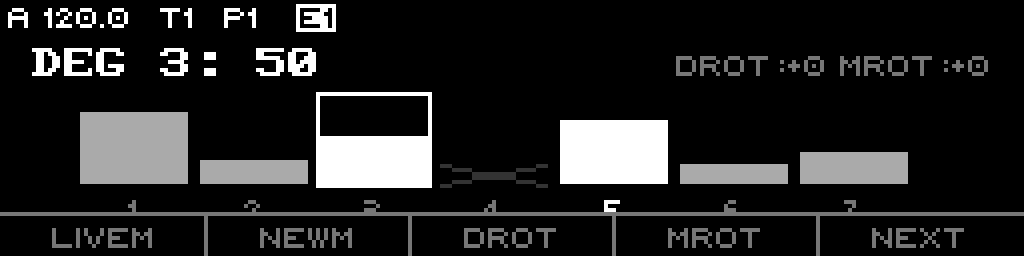
DROT / MROT.- F1
LoopM/LiveM— toggle melody mode. - F2
NewM— capture/renew melody. - F3
DROT— focus Degree Rotation for the encoder (highlights when active). - F4
MROT— focus Mask Rotation for the encoder (highlights when active). - F5
NEXT— next page.
LEDs: in-scale degrees green; the currently-playing degree red; a selected degree amber. Quick-edit: Page + S14 = INIT (all degrees uniform), Page + S15 = EVEN (all to selected degree's value), Page + S16 = RAND.
DURATION page
Duration-slot tickets. Header DURATION TICKETS. Steps S1-S8 select a duration slot; the encoder edits that slot's ticket weight. The label shows the divisor-relative duration name and the weight.
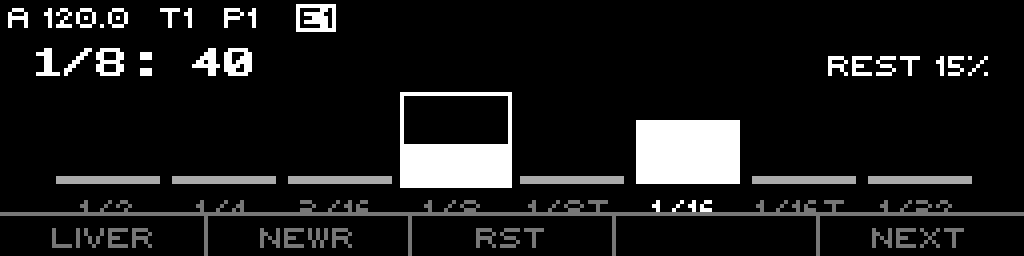
REST % sits top-right.- F1
LoopR/LiveR— toggle rhythm mode. - F2
NewR— capture/renew rhythm. - F3
RST— focus Rest probability for the encoder (highlights when active). - F4 — unused.
- F5
NEXT— next page.
LEDs: the 8 slots green; the playing slot red; a selected slot amber. Quick-edit: Page + S14 = INIT (all slots 50, rest 0), Page + S15 = EVEN, Page + S16 = RAND.
Part 9 · Setup & Routing
Track-scope list (Page+S2)
The Stochastic config list, in display order:
- Lock (yes/no)
- Play Mode (Aligned / Free)
- Clock/Div (divisor, default 12)
- Clock Mult (50-150%, default 1.00x)
- Reset Measure (off / 1-128)
- Scale (Default / named)
- Root Note (Default / named)
- Scale Rotate (Default / 0-31)
- Octave (-10..+10)
- Transpose (-100..+100)
- CV Update (Gate / Always)
- Slide Time (0-100%)
- Fill Mode (None / Gates / Next Pattern / Condition)
(Divisor, Clock Mult, Reset Measure, Scale, Root Note, Scale Rotate are per-sequence values shown here; the rest are track-wide.)
Sequence-scope list (Page+S1)
The performance list, in display order (grouped Playback / Pitch / Rhythm / Burst / Sieve / Window / Evolution): Rhythm (mode), Melody (mode), Refresh, Complexity, Contour, Repeat, Bias, Spread, MaskM, TiltM, Range, Note Duration, Variation, Rest, Gate Length, Slide Prob, Legato, Burst, Burst Count, Burst Rate, Burst Hold, MaskR, TiltR, Size, First, Rotate, Sleep, Patience R, Patience M, Mutate, Jump.
Refresh ("Exec") invalidates both Loop domains so they regenerate on the next trigger.
What is routable
The Stochastic routing targets — all per-sequence:
Mask(maskRhythm),Gate Length,Tilt(tiltRhythm),Feel,BurstComplexity,Contour,Note Duration,Variation,Rest,SlideSleep,Patience R(patienceRhythm),Mutate,Jump,RangeBias(marblesBias),Spread(marblesSpread),Burst Count,Burst Rate
Track-scope params route through the shared targets: Octave, Transpose, Slide Time, Clock Mult, Scale, Root Note, Rotate.
Not routable: Patience M, Repeat, Legato, Mask/Tilt Melody, Degree/Mask Rotation, the tickets, Size, First, the mode toggles.
Four hands-on performance controls
- Live capture — NewR/NewM freezes the live phrase into a loop.
- Renew — NewR/NewM in Loop mode rolls a fresh seed; Shift undoes.
- Page + S16 RAND — randomize the whole LIVE knob grid in one press.
- BPITCH — cycle the burst Hold/Roll × Fit/Over mode from the context menu.